Showing posts with label JDeveloper. Show all posts

Sunday, June 17, 2012

Using JDeveloper Maven integration to run Oracle ADF sample in Java cloud

Readers of this blog might already took a notice about one link on a right side, pointing to experimental page with live ADF sample application embedded on it. It looks like I'm not alone to have the idea of live ADF samples in my head. Zeeshan Baig, featured in recent Oracle JDeveloper OTN Harvest, shares the same wish too:  
 "Free cloud instance for ADF like apex.oracle.com which is available for APEX".  
 And fellow Oracle colleague Steven Develaar seems to get no sleep dreaming about live samples:
As a good sleep at night is one of important aspects of life in order to be able to deal with challenges during a day,  this blog post is aimed to make small step towards ADF Live samples and increase an average level of happiness in the community around the framework.

The sample application of this blog post is kind of "Hello World" for ADF and Bounded Task Flow, so the main focus is on using JDeveloper Maven integration (available since R2)  to create, package and run it.

The sample leverages a subset of the framework: ADF Faces components (view) and Task Flows (controller). As the cloud platform in this case is actually based on Tomcat 6, so the steps used to get it running on Cloud Bees java platform could be useful in case someone wants to run it on a Tomcat locally. Important aspect: the platform is not certified and supported to run ADF, so please don't expect to much, especially to get a complete ADF stack up and running on it without efforts.

Oracle Public Cloud was announced (again) last week - if you are in a position of having an account, so there shouldn't be a challenge to deploy  and run full ADF application stack on it - as stated here it is ready to run ADF stack.

Being not in the position yet i proceed with description of my sample.
The application,  available to download and run it in JDeveloper R2, should look upon a start like this:

Actually, if you see something like "ADF Task flow running..." in the area above this text - it is the sample application running in java cloud.

UPDATE: Recent power failure and associated infrastructure failures in Amazon US-EAST-1 impacted several high profile services  and also this ADF sample application -  the application was restarted again. 

You can click, for example, on a button next to become familiar with functionality of it. It is embedded in this blog post:
There is one page home.jsf with one bounded Task Flow named sample-task-flow, embedded as a region on it. Application scoped managed bean CounterBean.java is used to provide "rich" functionality of the sample: to display start date, and to count page views of two page fragments in a bounded task flow.

Lets go trough the steps used to create, package and deploy it.

Using JDeveloper R2 + Maven integration to create the sample ADF app for java cloud (in 5 minutes :)

We start in JDeveloper  with New -> Application -> Maven Application:
Step 1 of the wizard looks like this:
 Provide a name for the project on Step 2:
 Step 3: change packaging to war, other settings are default:
Finish. JDeveloper creates maven project structure for us together with pom.xml.

Note: Once you create a Maven application and project, JDeveloper also takes care about keeping Libraries and Classpath in Project Properties and dependencies in pom.xml in sync - very nice and helpful.

 Our project is quite new at this stage  - there are no dependencies at the beginning.

We just tailor one setting for now: go to Project Properties -> ADFm Sources and change ADFm Source Directory to point to ...src\main\resources like this:
It saves some manual fixing later, because once we start to use some specific features of ADF,  its metadata, like page definitions,  is going to be generated here. Otherwise we get ADF metadata created outside default resource path.

The other JDeveloper project properties were already set by the wizard:
  • Project Source Path points to ...src\main\java
  • Output directory points to ..\target\classes 
  • Project-> Resources look like this:

The steps used to create web content (fast forward)

Create ADF bounded Task-Flow in JDeveloper following default settings all the way: New->JSF/Facelets: ADF TaskFlow: ok. Task flow named task-flow-definition.xml is created.
Open it, drag&drop  two view components , provide two control flow cases and names for them:
JSF page, named home.jsf, was created after that and the task flow was dropped as Region on it .
Java class CounterBean.java was created, JSF2 annotations @ManagedBean and @ApplicationScoped were used to put it into the scope of this sample. ADF panelLabelAndMessage  and outputText   components were used on UI pages of it. The picture of our sample Project in JDeveloper provides an overview of the sample.

Maven pom and Jdeveloper project libraries - what happens in a background

As already mentioned, JDeveloper takes care about Project libraries and Maven pom dependencies for us. Once some application component gets created, the required libraries are automatically added to the project settings and maven dependencies:

JDeveloper project libraries at this stage:
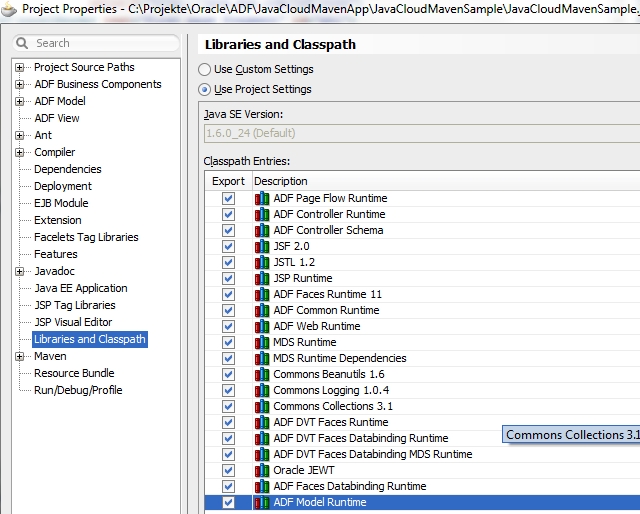
And Maven dependencies in pom.xml:
The same libraries and dependencies are in the list.

Few tweaks to get it up and running on java cloud

You might already guessed - there should be something more. Of course. Tomcat based java cloud platform is not certified -  some manual "tweaks" are necessary to get the sample up and running on it.
  • Add 2 JRF libraries as maven dependencies in JDeveloper-> maven settings to pom (Tomcat doesn't provide JRF Runtime libs  -  we need to provide them together with our application):
  • Add one context param to  web.xml - to switch pretty URLs off :

  • The sample project contains one CloudBees platform specific  deployment descriptor: WEB-INF\cloudbees-web.xmlThe descriptor  provides a name (or application id) of bees application created  for this sample-  in this case <appid>mavenproj</appid>. 
  • Only for embedding ADF application as iframe pointing to different domain -  frame busting context param was set to never in web.xml to prevent the application "pop-out" from this blog:

  • Trinidad jars trinidad-api.jar and trinidad-impl.jar were copied manually from JDeveloper library locations into application directory WEB-INF\libs to overcome some lib compatibility issue.

We can use Maven package goal to package it as war, for example direct in JDeveloper like this:

And the log output in case of normal execution shows a successful build and one webapp packaged as JavaCloudMavenSample-1.0-SNAPSHOT.war:

That's all  -  the section how  to create ADF sample app for java cloud in 5 minutes is finished.

Our application is ready - its time to test and deploy it.

Deployment to CloudBees java platform
GettingStarted provides few ways how deploy java application to the platform (called RUN@Cloud). One of them is to download SDK and use CLI  (command line interface) tool.

Note: the CLI is normally cloud service vendor specific - for this platform the command line utility is called bees.

Once SDK is downloaded and configured -  it can be used to create and deploy applications on the platform.

You have also to sign up to the platform and subscribe for run service - like always before using some service on the Internet. There is also a free subsciption to start, limited in resources,  but enough to run the sample of this blog:

Using bees console (CLI),  test the application , packaged as war, locally first:

>bees app:run target/JavaCloudMavenSample-1.0-SNAPSHOT.war

Note: one error message (besides some other messages) is displayed: oracle.jrf.UnknownPlatformException: JRF is unable to determine the current application server platform. 
It is ok - the platform is not certified,   oracle JRF doesn't know it and the Exception states exactly this.

Once the sample is running and responding locally (http://localhost:8080/faces/home.jsf) , it can be deployed to java cloud platform by issuing a command:


>bees app:deploy target/JavaCloudMavenSample-1.0-SNAPSHOT.war :


Conclusion

Following description in this blog post we created a simple ADF Application leveraging View (ADF Faces) and Controller (Task Flows) part of the stack. We used JDeveloper Maven integration to set up Maven project structure and to package it.

And finally we followed the principle of java "write once - run everywhere" and got our ADF application (ADF is java standards based framework facilitating an easy usage of it declarative way) running  "everywhere" - locally and in a public java cloud.

The sources of this sample are available at github.

Sunday, May 13, 2012

Detecting emotions by using JSON and REST services in Oracle ADF

Developers using Oracle ADF to build applications most likely get in touch with ADF Business Components (exposed as Data Controls) first. The framework provides few other types of Data Controls out of the box , like URL Data Control, to facilitate an access to various data sources and services. There are plenty of services available on the Internet which are  based on REST protocol and JSON format  -  consuming them in ADF might be of interest.

The sample application consumes two external JSON+REST services in ADF by using URL Data Control.  It provides a Timeline of some twitter user visualized in ADF UI together with emotion, automatically detected in a message text:


The color and the sign  :)  stands for positive ,  :| for neutral,  :(  for negative emotion detected in a message text.

As one can see, the emotional state discovered in  tweets of twitter user named @ladygaga is quite versatile and shows user feelings changing during a day. Just to compare, the twitter user  @adf_emg seems to keep stable neutral emotional state for a longer period of time:


Let’s take a closer look at technical implementation of the sample. It is available to download and ready run in JDeveloper 11g R2.

Once executed  (Run home.jsf), it should display a page like this:


The response of REST+JSON services is displayed on the page. A panel on a right-side shows an output of TwitterTimlineService. The output of EmotionAnalyzerService for the current row (upon selection in a table) is displayed at a bottom of the page.

Of course, tweets of any public twitter user could be analyzed - just enter  a user name and press “show tweets” in case of interest.

Note: there is no special exception  handling in a sample app, so the results in case of network failure might not be pretty. In case of errors running it locally check your network settings (proxy settings in JDevleoper for example) and the name of twitter user entered - does it exists?

Using JSON+REST services as URL Data Controls

The sample consumes  two simple REST+JSON services as ADF URL Data Controls: Twitter TimelineService and FeelingAnalyzerService.

Readers interested  in Twitter API might find a test Console as good starting point to explore it. 

The FeelingAnalyzerService ,included  in a sample project, was kindly provided by Enrique López-Mañas. I came to his blog post "Flirting with sentimental analysis..."  by looking for some JSON-REST service suitable for ADF JSON-REST sample. Refer to Enrique in case you are interested in  “magic” which helps to turn computers to humans :) 

I proceed  with  description of this small “value added” solution showing how to integrate two REST + JSON services in ADF.

Three Data Controls are used in the sample:


POJO Data Control ShowTweetsPageAdapter,  built by doing a Right-Click -> Create Data Control in JDeveloper on ShowTweetsPageAdapter.java class, contains a method transformTwitterJSONString2Tweets:


The method  takes return value of TwitterTimelineService (tweets in JSON format), transforms the tweets from JSON format to domain model (TwitterTimeline POJO) and makes a call to FeelingsAnalyzerService (URL Data Control) in java for each Tweet to detect emotion in a message text.

The other two data controls, built by using Create URL Data Control wizard in Jdeveloper, provide one method called loadData,  which returns a single column (name Colum0 , type string) as a result:


URL Data Controls were configured to parse an output as CSV yet (JSON parsing support in ADF might come in a future release of ADF).

Let's take a look at the properties of TwitterTimelineService Data Control, which is built on a service statuses/user_timeline.json  creating  TwitterAPIConnection on a way by using Create URL Data Control wizard in JDeveloper.


Setting {tab} as Delimiter and Quotechar to {none} enables to get JSON output as single Column of type String.
The property Source points to a path of a service URL together with a query_string screenName. ##ScreenName## is a placeholder for  query value being supplied at run time.

TwitterApiConnection (created using JDeveloper Wizard together with URL Data Control) points to URL connection  in a Panel Application Resources (persisted in a file connections.xml):


The connection carries URL endpoint of Twitter API:

URL Data Control FeelingAnalyzer and URL connection FelinganalyzerApp  was created  in JDeveloper using the same technique.

Structure of the sample application


The application contains one default unbounded flow adfc-config with one page , called home.jsf as a container for  the bounded flow  tweets-task-flow-definition.xml, embedded as a region.
The flow tweets-taks-flow-definition.xml contains default view activity, named showTweets. A page fragment  showTweets.jsff carries a UI of the application and includes some EL expressions as inline-style to color it a little bit.

Three services (2 provided by URL Data Controls and one from Bean Data Control) are wired in a page definition of showTweets.jsff  declarative way.


Wiring service calls 

Readers familiar with ADF Bindings are already aware,  that a method Binding gets executed implicitly in case the return value of it is displayed on a page or consumed as an input value of some other method binding. Lets look at Bindings section of page fragment showTweets.jsff:


Column0 binds a return value of method loadData from TwitterTimelineService data control. It was created first by Draging a Column0 from Data Controls and dropping it to a page ( area on a right side in a sample application).

The second step was performed to transform a tweets from JSON string to a list of tweet domain objects. We continue with a D&D in order to display the list of Tweets on a page:


Drag&Drop a tweetList  on a page (ADF ReadOnly Table was chosen to display it). Editor Edit Action Binding shows up:


We need to provide a value for input parameter tweetsJsonString. So we can use a value of Column0 , which contains exactly what is needed here: tweets in JSON format as String.

Using Drag&Drop twice, both method calls (loadData of Twitter URL Data Control and transformTwitterJSONString2Twets of Bean Data Control) are wired declarative way to provide a list of Tweets on a page.

Emotions are still missing, so we  call a FeelingsAnalyzerService in order to detect them and enrich our tweets.

First, create a method binding by doing another D&D with  return value of FeelingsAnalyzerService service method loadData:


Drag the Column0  (selected in a picture) and drop it on a same page showTweets.jsff (bottom area in a sample application was chosen as a drop target). Edit Action Binding shows up. We provide a value for parameter of the method (it expects some text  in order to detect emotion in it):


The expression points to a currentRow of tweetListIterator.  The expression-part  dataProvider returns a POJO  behind a row, in our case it is an instance of java bean Tweet.java. The message is an attribute of the been, so this part of  EL resolves to method call tweet.getMessage() on instance of the been.

NOTE: because of ADF Table  “stamping” rows  into variable “row” (which is not available in bindings), this method is NOT executed  for each row when table is rendered. The current row points to the first row in iterator binding, the method gets executed  with a value of a message from a Tweet behind a first row.

The last step was therefore a preparation in order to call this method in java for each row (Tweet) and do it by using  method binding defined in a page definition.

Few lines of java code are used to achieve that. First we get an instance of method binding:

Second part is to provide an input value for a method call, execute it and retrieve the result:

The rest of the source code, included in  ShowTweetsPageAdapter.java, is basically used to deal with JSON parsing by leveraging the reference JSON parser implementation and to transform it to custom domain objects.

To finish the post, the summary provides a list of  ADF and JSF2 specific design features, used in the sample application.

Summary


  • “Twitter Timeline” designed as reusable component and implemented using ADF Faces bounded task flow with parameters.
  •  Functionality provided by ADF leveraged to consume two JSON+REST services a declarative way using ADF URL Data Control (CSV)  and Connections.xml
  • The functionality of JSON parsing, which is not (yet) available  as ADF Data Control , compensated  in  java (ShowTweetsPageController.java) by leveraging third party JSON parser.
  • The result of Twitter Timeline service enriched with emotions by calling a method binding of URL Data Control (which is based on external REST+JSON service) in java.
  • JSON output transformed to domain model and exposed to UI as a POJO Data Control.
  • A value stored in JSF2 @ViewScope used to provide an input to a task flow embedded as region.


The source code of it is available on github.

Wednesday, April 11, 2012

Set Initial Focus component for Oracle ADF Faces

Oracle ADF Faces components provide rich functionality out of the box. One small feature is missing somehow:
a convenient way to set initial focus on input component.

For the inpatient readers: sample workspace to download and start with JDeveloper 11.1.2.1
(11g Release 2) containing a custom tag <adfExt:setInitialFocus/> and a sample usage of it.

<adfExt:setInitialFocus/> features:
  • Drag and Drop usage  from Control Palette in JDeveloper: ADF Extensions -> Set Initial Focus
  • Drop on editable components, like inputText etc.
  • Handles multiple usage of the tag - initial focus is placed on first input component rendered in a view
  • Handles submit on a same view - the focus should stay where it is
  • Handles  properties readOnly, disabled, visible of input component.
    Initial focus doesn't provide much value in case an input component is not visible or read only.
  • Works with regions and therefore with components reused multiple times
The implementation takes advantage of JSF2 (JDeveloper R2)  features like facelets tag library, @FacesBehavior annotation and Behavior API.

NOTE: The principles of implementation can be successfully applied in a previous versions (11g R1 with JSF 1.x) , feel free to take a code and adapt it to your needs.

Steps to get the tag into your web project and use it in JDeveloper Component Palette (directory structure of a sample web project is assumed):
  1. Copy the file SetInitialFocusBehavior.java  (implementation of the tag) into your project.
  2. Copy the file adfExt.taglib.xml (facelets tag library with a definition of it) into WEB-INF\resources directory 
  3. Add the following context parameter  into web.xml:

Check if tag library is present in JDeveloper Project Properties:

Once configured, a new library ADF Extensions should be available in JDeveloper Component Palette:

There is one component in a library:


Drag and Drop it on some input component, like af:inputText:


Once the page is rendered, a cursor should be placed on that component:

Lets take a closer look to the use case of "Set Initial Focus" component.


User experience

A user opens an input form (built with ADF Faces) to enter some data. The cursor is placed on first editable field, so he can proceed using a keyboard instead of grabbing a mouse first.  After initial focus is set, the user takes a control on cursor position. Once the user took a control and started to navigate ( using TAB or arrow keys), he can finish his work and submit a data entered.


Note: the first input field might not always be the case  - a developer might choose the most suitable component to set initial focus on, based on specific requirements. 


Developer experience 

A software developer might expect to mark a component as a candidate for the initial focus with almost no effort:
  • set a property on appropriate component (initialFocus = true)
    or
  • Drag a control, like "Set Initial Focus" from a component palette in JDeveloper and drop it on the input component of a page.

Implementation challenges

ADF is designed for reusability, especially the bounded task flows facilitate that. One of the challenges covered in this blog post  from Frank Nimphius is related to the naming containers and the naming path: it is not always a case to know it in advance. It results in difficulties to locate a component in Javascript.
Reusable components are (and shouldn't be) not aware about a usage context of them. The simplest way to set a focus is on the other hand to call a Javascript function focus() on component once it has been rendered. We need to get an instance of component in Javascript, therefore need a client Id in order to find it.

ADF Faces provide a build-in AJAX functionality to reload  parts of a page. The implementation using Javascript has to take care about it. In case of partial refresh, a user is still on a same page and doesn't expect the cursor to jump away (see the blog post from Edwin Biemond and the first comment on it).

Addressing the challenges

The implementation of <adfExt:setInitialFocus/> tag is aimed to address the issues described in order to provide an experience  users and developers expect. Some new features provided by JSF2 are used.

One of the features used is Behaviour. See the blog post Das Behavior API with a description of it (oups - it is german link, sorry -  I took a notice about a language only reviewing a post. I leave the link  - modern browsers offer built-in translation, so it helps to google for additional resources in case of interest). My expectation on ClientBehaviour was to get an access to the clientId of component in java code. I'm not sure, if its by design, but one might expect that in case a ClientBehaviour tag is attached, the ADF Faces component renders also a client-peer of it. In that case, there is no need to set a "client Component=true" every time you use initial focus tag. The implementation and my simple tests met the expectation. Drop me a line in case you are familiar with internals of ADF Faces in relation with  ClientBehavior.

Facelets in JSF2 allows to build a tag libraries with ease, so it was selected to provide initial focus functionality for developers as custom tag.

The sources of sample project and implementation are available on public Github repository. In case someone might want to extend, rewrite or fix some issue - it is aimed to facilitate that.

It would be nice to get a feedback on usage of the tag - does it behave in your environment like expected?

To finish the post, a snippet of the source provides the rest of implementation details: